

Fax Server
Useit Fax Server v9 is a powerful .NET fax server featuring fax/mail for Office 365, Gmail, and Microsoft Exchange, MFP fax integration, web-based administration – all backed by stellar support.
Fax/Email for Office 365, Gmail, or Microsoft Outlook.
Send and receive faxes using your email client.
Compatible with on premise and hosted email.
No extra client software required.
No user training.
Choose your own fax domain name.
Simple, quick deployment.
Receive faxes via email with PDF attachment.
Fax confirmation emails.
Deploy a Virtual Fax Server on VMware, Hyper-V, or XenServer.
With Useit Fax Server, you can migrate and deploy your entire fax server architecture running on your favorite hypervisor.


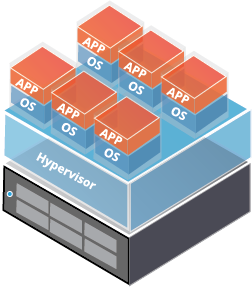
Shapshots for quick fax server backups.
High-availability with vMotion, live-migration, and XenMotion.
Quick deployment using virtual server images.
Smooth migration between physical hosts.
Enterprise Fax at a Small Business Price
Fax machines cost money to maintain, and are incredibly inefficient. Replace the fax machines with a user-friendly, budget-friendly fax server.

Fast ROI and Low TCO
Useit Fax Server features a robust web services architecture powerful enough to handle the highest of fax volume demands, yet affordable enough to realize a realistic ROI in a short period of time.
Grows With You
Keep the initial cost down and scale your fax server as your business grows. Adding lines and DIDs is simple and quick.
Leverage our Knowledge and Expertise
Consult with a solution expert today to design a fax server solution that’s right for your needs and easy on your budget.
Powerful features and cost-saving benefits.
Explore countless features and discover how to obtain a rapid ROI with Useit Fax Server.
Fax/Email integration for every email server/service.
Secure web portal for admins and end users.
Scan-to-fax from any MFP/MFD or network scanner.
Supports fax over IP and traditional PRI and analog service.
Certified for Windows Server 2012 R2.
Certified for Windows Server 2019.
LDAP integration for Microsoft Active Directory.
Robust .NET architecture provides better stability and performance.
Designed for fault tolerance and high availability.
Scalable from 1 to thousands of fax lines.
Compatible with VMware, Hyper-V, and XenServer.
Comprehensive web-based reporting on fax metrics
Customize email templates and add your logo for personalized branding
REST API and XML Module for application integration
Live Demo
Schedule a live demonstration with a solution expert.
Download a Trial
Download a free proof of concept trial. Free remote installation and training included.
Get a Quote
Work with a solution expert to obtain a personalized solution quote.
Resources
Locate system requirements, datasheets, manuals, and tech notes for Useit Messaging fax solutions.
Useit Fax Server System Requirements
Processor
2GHz or higher
Memory
2GB or higher
Disk Space
500 MB for Use it Messaging installation files.
Operating System
Use it Messaging Server is compatible with the following operating system software:
- Microsoft Windows Server 2012 R2 Standard and Datacenter
- Microsoft Windows Server 2008 R2 Standard and Enterprise
- Microsoft Windows Server 2008 Standard and Enterprise
Database Platforms
Microsoft SQL Server 2014/2012/2008/2005
NOTE: A full Microsoft SQL Server is the recommended for production deployments. SQL Express may be used in lab settings and during proof of concept trials.
Supported Email Systems
Use it Messaging Server is compatible with the following email systems and services:
- Microsoft Exchange (all versions) – on premise and hosted
- Hosted Email Services (Office 365, Gmail, etc.)
- IBM Notes/Domino
- Novell GroupWise
- Other SMTP-compliant mail servers
Other Requirements
- Windows Internet Information Services (IIS) 8/7 service
- Microsoft .NET Framework 4 or higher
- Windows IIS SMTP service – required only when faxing via email
- Microsoft Office or Libre Office – required for conversion of outbound MS Office fax attachments
- Adobe PDF Reader or Foxit PDF Reader – required for conversion of outbound PDF fax attachments
Spported Virtual IP Fax Driver Software and Fax Boards
Virtual Fax Drivers (FoIP)
- Dialogic Brooktrout SR140
- XCAPI
Hardware Fax Boards
- Dialogic Brooktrout TR1034 Digital (T1/E1)
- Dialogic Brooktrout TR1034 Analog & ANalog DID
- Dialogic Brooktrout TruFax Analog
Need immediate assistance? We're here to help.
Call (800) 329-9099
Give us a call. We want to hear from you.Email Us
We like emails too. Drop us a note.